🐟 Fish rocks. I've been using it exclusively for the last year, and I can't imagine giving it up.
There seem to be a number of misconceptions, which I will endeavor to address. The first is: "Fish isn't POSIX/bash-compliant, so there are compatibility problems." POSIX non-compliance is a feature, not a disadvantage, of the fish shell. It means there is less legacy baggage and syntactical inconsistency. I can count the number of POSIX/bash compliance-related issues I've had with fish on one hand, all of which were easily dealt with. For example, Vim assumes that your shell is sh compatible, but adding set shell=sh in your .vimrc solves that. The only other significant one for me was virtualenvwrapper, which doesn't support fish. Not a problem: Virtualfish solves that handily: https://github.com/adambrenecki/virtualfish
Want to run a bash script? Just run bash fooshnizzle.sh. Want to switch to bash for a moment? Run bash and then exit when you want to switch back to fish. This POSIX-compatibility topic is, in my opinion, much ado about nothing.
Another misunderstanding seems to be, "I can do XYZ in bash, but fish doesn't support that." Fish purposefully limits the number of "builtins" -- commands that fish includes by default -- in order to maintain simplicity. For me, that's a feature. When I find that there's something I want to be easier to do in fish, I whip up a tiny function to do it. Not only is that extremely easy to do in fish, but then that command performs precisely the way I want it to. I haven't pushed many of those to my dotfile repository yet, but you can check out some of my fish functions there: https://github.com/justinmayer/dotfiles/tree/master/fish
Fish is fast, the auto-completion is amazingly helpful, and it's intuitive to use without too much configuration. Give it a try. 🐟
I just wish it didn't insist on doing everything differently. For example, PATH is traditionally delimited with colons in just about every shell; fish uses spaces. This instantly breaks compatibility with legacy environment configuration, and for no particularly good reason that I can see.
I was excited to try fish, but I found it impossible to get configured in an established environment with entrenched bash usage (which zsh, by the way, has no problem with)
Do you mind sharing more details about your legacy environment configuration? How are you currently setting $PATH? Usually the differences in syntax for setting variables causes more problems than the colons.
Regarding $PATH: it is actually not delimited at all in fish. Instead, $PATH is an array, which is a first class notion in fish. This allows for nice tricks like, say, looping through $PATH:
   for dir in $PATH
        echo $dir
   end
or deleting its last entry:
set --erase PATH[-1]
Of course, fish flattens $PATH into a colon-delimited string when setting it as an environment variable, and unflattens it when reading it from the environment.
PATH gets set the way it always did. For example in bash:
export PATH=$PATH:<new_dir>
As for the larger question of environment configuration; we pull in a number of shell configuration scripts owned by the infrastructure teams. You are right, there is no universal way to set path due to things like "export" vs "setenv", but often multiple shells support the same syntax so you can sometimes use a config script meant for bash in zsh, for example. I had hoped that fish would be able to use csh scripts, because it shares "setenv", but csh of course delimits PATH with colons.
You say that PATH is treated as a colon-delimited string when accessed as an environment variable... Hmm. That wasn't what I was seeing, but it is entirely possible I made a mess of things, or that I broke things when I compiled it.
Anyway, it's unlikely I personally will be able to use fish. I hit many more obstacles than just PATH, but that was the easiest example and I thought I'd share some feedback.
Thanks for elaborating. Yes, it's a common issue to encounter configuration scripts, .profile files, etc. that use POSIX syntax, and it's understandable that people will be unwilling or unable to port them to fish. Usually these are just standalone scripts which can be run directly via /bin/sh, but sometimes you want them to be part of your interactive shell.
I've solved the configs-in-other-shells problem by writing a translator that sources the target config file, and then exports the needed variables in their desired syntax for my shell of choice. Simple example (config in csh, my language of choice was bash):
I've been a zsh user for a long time and I have to say that fish is great! Its super fast and starts almost instantaneously. On zsh, I would always use fasd[0] to help jump directories, but on fish I dont feel the need. The auto-completion is just fantastic. If I were you, I'd give it a try just for the awesome tab completions.
For the 'oh-my-zsh' lovers out there, there's 'oh-my-fish' as well - https://github.com/bpinto/oh-my-fish
Agreed. I've been using fish now as my default shell, it took a bit of time to get used to but it's definitely been worth the time porting my zsh functions/aliases over to fish and adding inline documentation.
I'm playing around with fish since a couple of minutes and one zsh completion thing I am missing is "fuzzy" completion. In zsh with the following files in a directory:
The variant that I most miss is the partial completion on paths. With zsh I got into a habit of `cd c/s/b/<tab>` and having it expand to `cd code/sites/blog` so long as the tabbed path is unambiguous.
I think `-c` skips loading configuration. Launching a prompt will be much slower. In fish almost everything is a function and functions are loaded lazily.
Thing is in fish functions and completions load lazily as needed, and basically every customization is done with functions. Startup is pretty much instant regardless of configuration.
"not bash compliant" really is the main deal-breaker. When you're getting technical support on some issue and somebody tells you to paste a command into your terminal, "bash compliance" (or at least POSIX-shell compliance) is pretty important. When your phone rings at 2AM and somebody asks you to urgently fix a production problem and you can't figure out what's going on because the production server doesn't have your custom shell installed, that's a problem.
It's not a deal-breaker, of course. If you become fluent in POSIX-shell you can translate between it and your custom shell, and things should be fine... but becoming fluent in two shells is a lot more work than becoming fluent in one shell.
If you never need to interact with other people's machines, and other people never have to interact with yours, then sure, go nuts and install whatever shell you want.
If you install fish on your local machine, you'll still be able to run bash and punch those commands right into it—just do
$ bash
And hey presto, back in bash land.
I agree that it makes sense to know the lowest common denominator well before you go after something better—especially as you'll know straight away if and why it's "better".
Slightly OT, but I honestly think that "community best of" projects like oh-my-zss and the Vim ones actually do people a disservice since they are not zsh or Vim, but rather someone's opinionated, non-standard version of them.
All your executable shell scripts should start with a hash-bang indicating the executable that interprets them. If your script runs on your custom shell and it's not installed, it'll let you know instantly.
We found one annoying case[0], and one critical case[1].
The annoying case is vim plugins that use $SHELL to execute some bash/sh code. The workaround is to specify `set shell=sh` in .vimrc. We did not attempt to address this in fish (I didn't check but I would guess that tcsh is affected the same way).
The critical case is, at the login window, OpenSUSE invokes the login shell with a POSIX-ism (specifically 'exec "${@}"'), which was not recognized by fish. So setting fish as your login shell would lock OpenSUSE users out of their machines entirely!
What we did was hack fish to recognize exactly this command in its arguments, and handle it the way OpenSUSE expects, via a new function "fish_xdm_login_hack_hack_hack_hack". Heh.
There are several simplifications of POSIX syntax; the syntax feels a bit like Tcl as a result.
The most annoying differences are the missing/changed special variables: POSIX has special $@/$* to return parameters: you have to use arrays for these in fish. POSIX puts exit status in $? and fish in $status; also $$ becomes %self, and there is no convenient way to expand to the PPID. Also annoying is the absence of "||" and "&&" operators.
That's because the syntax was redesigned to be more orthogonal. So $ is always followed by a word to expand a variable and not an arcane symbol, % is used for a wide variety of ways to get process ID's, and it's easy to set up arrays besides just $argv (plus if you do $argv on its own, it creates one word for every item in the array, without you having to worry about bizarre quoting).
Most of these differences, and why they were made, are explained in the manual.
If 'or' is 'just a command', I would think the shell would evaluate $cmd3 before calling $cmd2. Or are 'and' and 'or' built-ins that are similar to Lisp special forms/Forth immediate words?
I recently tried setting fish as my default default and I encountered some trouble, for example my $PATH was incomplete (there was only /bin, /usr/bin and /usr/local/bin left in it if I recall correctly).
I reverted it back to bash and I get fish as my shell by spawning "urxvt -e fish" instead of "urxvt" (in my window manager configuration). This works well.
You're aware you can configure your PATH trivially from fish, right? The preferred way to do that would be something like
    if status --is-interactive
        set PATH ~/.local/bin /opt/local/bin $PATH
    end
in your ~/.config/fish/config.fish file. Your other shells have the paths you want either because you configured them that way at some point, or because their global configs (e.g. /etc/bashrc) have broader paths. There's nothing magic going on here.
Oh, that explains why I need to run sudo with the -i option sometimes while using fish as my default shell! I'm going to try setting my shell to bash, and configuring my window manager to run fish in terminals. Who knows what other variables I'm missing out on...
I've been using it comfortably for a while as my primary shell with no issues. Pretty much all scripts I've had to run use a shebang line to manually invoke /bin/sh or /bin/bash which still works fine.
This is a feature. See https://github.com/fish-shell/fish-shell/issues/683. It appears to work in bash, but only because globs simply write themselves if they won't find anything. The behavior is misleading. But also having to escape ? is somewhat annoying.
Also, URLs with & don't work in bash anyway. Or rather, they will work, but do something you wouldn't expect - it would ignore & and everything after it, and run command in the background.
Please note that zsh works similarly to fish. Well, mostly. It seems that zsh has special logic that automatically inserts backslash before ? if it detects an URL. Perhaps that could be implemented in fish. But it also feels somewhat magical. Why "\?" would appear when I type "?"? But perhaps it's the best way. In your case, it's possible to break it. But the break looks really contrived, so perhaps zsh behavior would be safe.
  [glitchmr@pineapple tmp]$ mkdir -p https://news.ycombinator.com
  [glitchmr@pineapple tmp]$ touch https://news.ycombinator.com/itemsid=5723235
  [glitchmr@pineapple tmp]$ wget https://news.ycombinator.com/item?id=5723235
  --2013-05-17 13:39:09--  https://news.ycombinator.com/itemsid=5723235
  Resolving news.ycombinator.com (news.ycombinator.com)... 184.172.10.74
  Connecting to news.ycombinator.com (news.ycombinator.com)|184.172.10.74|:443... connected.
  HTTP request sent, awaiting response... 404 Not Found
  2013-05-17 13:39:10 ERROR 404: Not Found.
Right, makes perfect sense of course as the standard goes.
Sometimes just wish URLs were handled in special way in shells. Fish isn't compatible with bash, couldn't it go step further? Some magic isn't always bad...
You give bash more credit than it deserves. `wget url?a=1&b=2` is parsed as`wget url?a=1 & ; b=2` ie, it runs `wget url?a=1` in the background and sets the shell variable b=2.
The documentation needs a lot of work. Every 'help' command I've tried just pops up a web page using xdg-open, which (a) won't work well in a headless SSH session, never mind a plane, and (b) doesn't make it easy to search for specifics.
I also don't like the implementation of the prompt text as a function. It's the first thing I wanted to customize, and it looks like I need to copy and paste the existing definition of fish_prompt and hack it into shape. There's no built-in equivalent of \$, so you need to find out if you're root and do it yourself. And the existing check just does it with a string compare of $USER with 'root', rather than euid==0.
Hacking preferences in like this isn't a problem to begin with. The real problem comes down the road, when the defaults change and improve, and you now have to be concerned with merging your customizations with the new and improved stuff.
The built-in web browser is a cute feature, but all the prompts waste space with <username>@<hostname>.
Autocompletion - a feature I generally don't use in other contexts - and reduced functionality seem to be its main USPs. With readline, process substitution and subshells (for ad-hoc fork/join jobs started from the command line) it might be competitive with other shells.
For example, a reasonably common pattern for me, on the command line, is:
    $ for d in *; do
    test -d "$d" || continue
    (
    cd "$d"
    time-consuming-task-1
    time-consuming-task-2
    ) &
    done
I don't think I could do this in fish today without writing a script, as it doesn't have subshells and can't run functions in the background.
There's also a big advantage in having the shell be the same (or highly similar) to your preferred ad-hoc scripting language. It means you can retrieve complex commands from your history and paste them into the script, with only a slight cleanup to parameterize them. A whole complex operation can be spiked and tested interactively before being put together into something reusable - possibly without foreknowledge that the task is going to be that tedious, or needs to be encapsulated. Zsh looks like a better alternative to bash for these reasons.
Fish currently does not support executing shell functions or commands in the background with &, only external programs. This is a known omission, but the best way to fix it is to make the shell interpreter code thread safe so we can actually write multithreaded shell code. Currently fish only uses threads for potentially blocking i/o operations. But implementing this is quite a bit of work and has not been done yet.
Having said that, `enc &` erroring is indeed a bug, expected behavior would be to run the `begin ... end &` block in the foreground anyway.
And how to incrementally search the history (i.e. anywhere in the command, not just the start of the line like the autocomplete)?
And does fish really need to separate out its subshell from text substitution? E.g. I'd write 'echo "my host is $(hostname)."' in bash, but in fish I seem to need to use 'echo "my host is " (hostname) "."', which is a lot more fiddly, noisy, ugly etc.
And do you know the equivalent of <() in bash? I use that with fgrep -f a lot. And (<todo.txt)? That's another one I use in workflows, though (cat todo.txt) would be a verbose alternative.
(I actually don't use fish full time, been experimenting once in a while)
I believe Alt+. (or any kind of history substitution) hasn't been implemented by design. I don't have references handy but they should be easy to find.
Incremental history search is just type something and then up arrow.
The rest of your questions I don't know the answers but it wouldn't surprise me if there were none. Fish prefers to have a simple and coherent syntax to a concise one (though I agree the text substitution is annoying – it seems they usually put the subshell result in a variable and expand that in the string).
Incremental search isn't too bad once I found out about bind and the other key bindings, as the arrow keys are some distance from the home keys.
Lack of Alt+. quickly became annoying. It's so useful; meanwhile, prefix search isn't a significant improvement over incremental search, and I usually know ahead of time whether my command is in the history or not, so being prompted an irrelevance is more annoying than having to type Ctrl+R in readline. I disable auto-completion in browsers, Google etc. for similar reasons.
You're right about not much else. Command substitution is the only thing implemented, not subshells or process substitution. I probably exercise my shell more than average, so I don't think fish is feature-rich enough yet for me.
It's a good thing the design goals have been updated to remove "a large performance decrease [...] is acceptable in order to improve [modularity]". That would have been a total killer. Process forking is often a performance limitation for me in the shell, so I strive, wherever possible, to use the builtins that fish so proudly spurned.
<($cmd) is called "process substitution." The fish equivalent is
($cmd | psub)
I miss incremental history search myself -- that's probably my most used bash feature. Typing a few letters and then hitting C-P or up arrow works, but there's no way to refine the search if you don't get the result you're looking for.
Why is no one putting in any time to replace the Windows shell (cmd.exe)? The stock offering is abysmal and Cygwin isn't much better. We could really use something with a bit of panache like this... Hmmm..
I'm guessing that people who cared about the terminal, and CLI in general, moved to other OSes a long time ago. And it's not just a glib answer, that's actually why I first gave Linux a real shot as my main system -- to replace Putty with a pretty, transparent terminal window and have all the GNU tools that go with it.
I can recommend console2+powershell. Powershell is basically bash but with object pipes instead of character pipes. It's all built on top of dotnet, so if you're familiar with c# you should feel at home with the API.
to kill all instances of internet explorer. The `ps` command outputs System.IO.Process objects. The ? { ... } syntax is a filter, inside which you can use $_ to refer to the element you're matching. You can access the 'Name' property directly and use -match to match it against an expression. Finally the % { ... } syntax executes some code on every element, in this case it calls System.IO.Process.Kill() to kill the process.
Console2 puts a nice face on things and supports tabbing and resizing, as you would expect from a usable terminal window.
I was working with this configuration for some time and it is really nice if you're satisfied with life inside MS's walled garden. The problem is that there is absolutely no interoperability with standard *nix tools. What's worse, PowerShell pretends that there is - `ps` in your example is just an alias for 'Get-Process' cmdlet, the same is true for cat, ls and other things.
Aside from that PowerShell is really solid shell. You can extend it with C# code and you get access to many .NET feature both in the command prompt and from PowerShell scripts. The scripts are quite nice for a shell scripts, it offers a few built-in data structures like arrays and hashes, there is a quite good autocompletion, even for .NET classes and objects and so on.
I love Console2. Be advised that it doesn't play nice with some things (or maybe the other way around?). I downloaded less for windows [1] yesterday and it completely hosed the terminal (changed all the colors and made the window ~10px wide and taller than my resolution).
Thinking back on it I'm not terribly surprised this happened given what Console2 is.
You may also like ConEmu (http://code.google.com/p/conemu-maximus5/). I switched to it from Console2 a few months ago and like it better - it has more customisation options and features like being able to move the cursor by clicking, administrator terminal in a tab, and the double-click to select a word thing that I constantly missed with Console2.
I'm in the process of learning powershell, and I must say it's extremely intuitive. More so than BASH or CMD, I'd say.
Every command is of the form Verb-Noun. Which means you can get off the ground really quickly, as there are only about 15 different verbs. This means you can often guess what you want, even for commands you've never used. Still can't find what you want? Then you can use wildcard searching on the Get-Command command, which returns all matching commands!
The icing on the cake for me is the consistency between interacting with different data sets. For example, New-Item is a command for creating a new item (duh!). The great thing about this however is that this command can be used to create files, registry entries, websites in IIS. This works by allowing you to browse all these things just as you would a file system. e.g. you can "cd" into IIS and treat it just like you would files on disk.
Really an eye opener into what a modern shell should be like
"Every command is of the form Verb-Noun. Which means you can get off the ground really quickly, as there are only about 15 different verbs. This means you can often guess what you want, even for commands you've never used."
Sounds quite a lot like VMS' DCL, which is similarly intuitive, albeit overly verbose at times.
What's wrong with cygwin (just curious what you dislike about it)? It's fine if you're just trying to do linux based stuff on Windows. It's much more complicated if you are trying to work with the Windows subsystem though. If that is your complaint, I would generally agree, but trying to integrate POSIX on the Windows object like model is not an easy task and what Powershell was made to try to do instead (as best it could since Linux is configured by text files mostly and Windows is Objects). Here's a great comment[1] by one of the developers of Powershell explaining why it is the way it is.
If you dislike using it directly through cmd.exe due to the abysmal UI (as I do), there's alternatives that let you use it with putty[2] and leave cmd.exe interface all together.
It's not so much that there's anything wrong with it, but it feels like a shim. Functionally, it's awesome, but it could do with sex-ing up a bit. I'm just envying the fact that Fish appears to have style; it's pretty. I like pretty.
There is almost zero difference functionally or appearance-wise between my Cygwin shell (running in Console2) and my work Linux shell.
Linux is much faster, primarily down to how reliant the Unix way is on forking and how much work Cygwin need to do to emulate that on Windows, but it's only noticeable when working with a lot of data that spawns O(n) processes.
Such scripts can often be rewritten as shell pipelines that don't scale in the same way. E.g. instead of running grep once per file, do xargs grep and filter by filename prefix if necessary; or instead of running mv once per file for renaming multiple files, convert to equivalent CMD syntax and output to a temporary batch file, and run the batch file.
I've got a number of scripts like these, implemented once for the Unix way, and again for Cygwin. But they don't come up all that often, and I haven't had to write one in years.
Try kitty + puttycyg with cygwin (or alternatively, just puttycyg[1], but it's no longer maintained and not as feature rich, but still works). I think that is what you're looking for from my own experience. You'll get all the features of putty and a 256 color terminal if you enable it, plus utf8 support. No local sshd required (I used to just ssh locally into cygwin with its built in sshd before I found puttycyg and kitty).
Mintty isn't an alternative to Cygwin, it's a part of Cygwin: an alternative to the standard windows terminal that Cygwin used to launch by default. Recent Cygwin installers actually set up Mintty by default.
You seem to be confusing terminals (programs that provide a text environment) and shells (usually text-based, often run inside a terminal). Mintty is a terminal. cmd.exe is a shell, but will spawn Windows' own ANSI terminal when asked. Cygwin's bash will also spawn Windows' own terminal when run without one. Fish is a shell, and needs to be run inside a terminal.
Console2 is different again. As I understand it, it wraps Windows' terminal, providing some extra features.
For me, it's not compatible enough. At work we have a few batch scripts that set up the path and set some environment variables, so we can launch compiles/tests/etc with a short command. These work under cmd.exe, but not under powershell. I keep meaning to experiment with powershell, but never quite enough to overcome that initial barrier. (I'm 95% on Linux, so it's not as if improving my windows workflow would make a big difference.)
Turns out that the batch file thing is a fairly common issue.
If you install the Powershell Community Extensions (PSCX), a pretty useful Powershell module in general, it has a command (Invoke-BatchFile) to execute a batch file and propagate the environment changes back to powershell. (While this is not always sufficient; I have found it to be enough for most purposes)
If you're 95% on Linux, you might like PowerShell just because it's a bit more familiar. You can run 'ls' and 'rm -r somedir' just like you're used to (although with quirks, 'rm' only takes one argument, but the argument can be a wildcard... which is expanded by rm, not the shell). I'd say I spend 98-99% of my time in Linux or OS X + zsh, and during my 1-2% time on Windows I was using MSYS until I found PowerShell.
It's a little complicated, it's also possible to use iPython, an enhanced Python interpreter, as a shell quasi-replacement on Windows. (It's even more powerful in combination with PowerShell.) Features:
It has tab autocompletion. You can send commands directly to the underlying system shell with '!' (e.g., !dir) and save the result in a Python variable for manipulation (a = !dir). It has special commands called "magics" that let you do neat stuff that the standard shell doesn't, like time how long things take to run. It has a robust command history.
What this means is you can write Python code as your shell scripting language.
The more interesting question is why doesn't 'nix have Powershell and a layer of abstraction upon which it can sit equivalent to the CLR?
Perhaps to be files all the way up is a limitation of the bazaar - at least until one hits the JVM, hopefully. There's no contract assuring that level of abstraction between the user and the turtles. And agreement that such a layer of abstraction is a good thing is unlikely to be forthcoming.
Yes I have to use Windows at work and I use MSYS. It doesn't have "everything" like cygwin, but everything is a native win32 application and interop is much better. I do use their bash but mostly use cmd.exe with all the MSYS binaries in my path, so I ls and grep and tail all I want and also still use other native windows command-line programs seamlessly. The bash will interop with some programs but not everything.
How long does it take for something to show up in brew? I see that Fish has a pull request issued a five hours ago, but I see quite a number of other items have pull requests going back months.
That version is nearly a year old; the fishfish formula was temporary and will be removed from Homebrew as soon as the canonical fish formula has been updated to 2.0. Hopefully the Homebrew maintainers will merge this soon (not sure what the hold-up is): https://github.com/mxcl/homebrew/pull/19887
That's probably the old 1.23.1 version. Run "brew info fish" and that's most likely what you'll see. Homebrew maintainers, as noted above, have not yet merged the pull request: https://github.com/mxcl/homebrew/pull/19887
I've tried fish a few years ago and wasn't all that impressed with the features.
That said, the new version is just ace! I gave it 30 minutes and it basically does everything I do with zsh right now. All that with about 5% of the configuration effort I put into zsh. Plus, it's so much faster than zsh.
I'll give fish a go as my main shell. Let's see were this goes.
Felt the same. Fish worked out of the box, but left me unimpressed about its abilities compared to zsh (well, I'd give it the same score as to zsh) until I realised I hadn't configured anything beyond generating man-completion files. I'll leave fish lying around so I can alt-tab to it and check it from time to time
If it's useful to anyone else, you can get around the gatekeeper by right clicking the app package and choosing Open. It will then present the option to "Open" as part of the dialogue box (as well as telling you how dangerous it is).
I've "skipped" zsh--I tried it a few times, but it didn't seem enough better than bash for it to be worth learning, converting all my scripts, and so on. fish does seem worth the effort, and in fact many of my bash scripts and configuration settings are now unnecessary.
If you're just jumping off bash and don't have a long .zshrc with aliases (which might make the migration a bit painful), then without a doubt try fish!
Several purple have mentioned 'incompatibilities' and I don't understand the problem: sure fish syntax is different and fish cannot be used to run a sh script, so just don't try to run sh scripts with fish. Every script I've run across starts with #!/bin/sh and I can use it from fish with no difficulty (it starts up a sh). The only issue I had is that Vim assumes that your shell is sh compatible, so I put a set shell=sh in my .vimrc and now all the shell stuff in vim runs fine. What problems did you mean?
Speaking for myself, there are a number of times when I have to source scripts from bash to get certain functionality I like. Most notably, when using virtualenv.
I guess the vim issue I ran into (that I solved by telling vim to use sh: set shell=sh), is the same sort of problem as the 'git mergetool' problem you mention.
My situation exactly oneandoneis2! I've used Bash for 12 years, tried zsh for the last few months and not really noticed the difference tbh. Will see if fish gives me an 'aha' moment
Out of the box, no. I've since switch to rbenv, which I actually like much better, and https://github.com/adambrenecki/virtualfish is a very nice port of virtualenvwrapper to fish.
I have both RVM and Venvwrapper setup in zsh. After installing fish everything worked right out of the box - without making any changes to the config files.
I've been using and contributing to Virtualfish, which replicates nearly all of virtualenvwrapper's functionality. Highly recommended: https://github.com/adambrenecki/virtualfish
I'm writing a clone/rewrite of virtualenvwrapper in pure python, I'll announce it on the fish mailing list, since the main reason I created it is that I felt this pain as a fish user myself
I use Rails with rbenv, a common package which adds shell commands to control which version of Ruby is used. There is a fish port of it, so when you run the very common command "rake" it invokes a fish function which sets up the right environment. And when you do run rake, you often need to set environment variables to set one-time options for the procedure you're invoking.
Now the trap is set for the would-be fish user. Because you're actually using the fish shell to customize a command, you can't just punt to env with "env VERSION=20130411222645 rake db:migrate:down" because you actually want to run the fish function, not an executable.
So for now, I'm setting environment variables at the command line and unsetting them afterwards. It's really getting old, especially because it loses context in my command history. I think I'll probably ditch fish if I can't find a workaround for this, so any suggestions are appreciated.
A universal variable is a variable whose value is shared across all instances of fish, now and in the future - even after a reboot. You can make a variable universal with set -U:
My problem is not specific to EDITOR variable. E.g. sometimes I need to set PYTHONPATH per specific command. What irritates me is that the syntax to do that.
I am not asking for a way to make a variable universal, I am looking for a way to specify variable per command.
I used fishshell for the better part of a year and enjoyed the experience. However, a few things bugged me:
- Anything that shells out using your default shell seems to assume a bourne-compatible shell. I remember this biting me when using various emacs commands that assumed all the world is a bourne shell.
- Copypasting commands is annoying too, but I've been evaluating zsh for the past few months and i've been bitten there too...seems like anything that isn't bash will run into that issue, and you can always just use bash for those instances.
- Virtualenv comes with a fish shell script, but last I checked it didn't actually work.
- Does fish still throw a hissy fit every time you try and tab-complete a command and your $PATH has a non-existant path in it?
I would severely miss the history completion. I can't count how many times I type !vi to return to the last file I was editing while goofing around in between editing sessions, or !scp to re-upload a fixed package. I understand the need for simplicity, but hitting the up arrow an undefined number of times until I see the command I need seems less efficient.
Other than that fish looks really polished and I plan on devoting a few days to it to give it a fair shake.
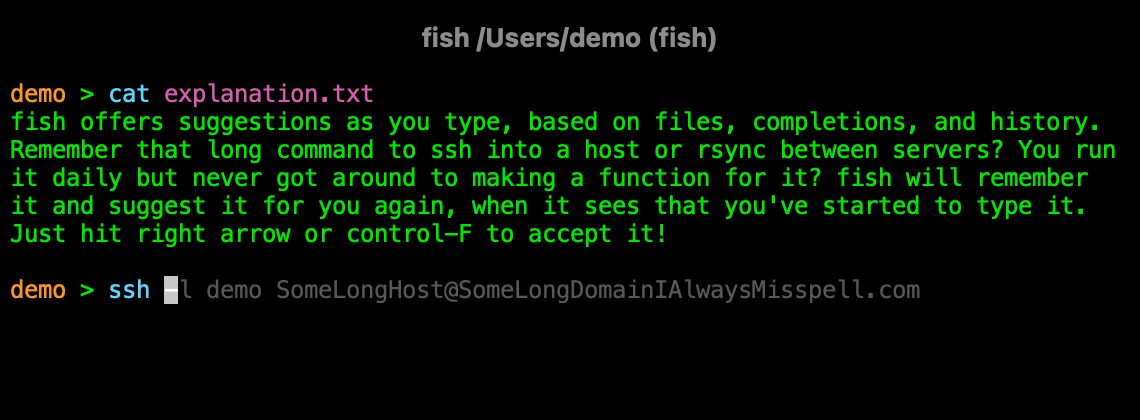
One of the nice features of autosuggestions is that they remember which arguments were files, and which ones were not. So if you have changed directories, !vi will edit a file that does not exist - probably not what you meant to do. The fish autosuggestion won't suggest it at all.
Somewhat tangential but is there any reason why the IRC chatroom is on OFTC rather than Freenode? I think it's the first time I see an open source project using OFTC.
Possibly a historical artifact; fish was created in a time when the controversies surrounding lilo were fresh in memory and lilo was still boss. Actually there is a channel on freenode now, but it's about a third in size.
Other examples of projects officially on OFTC include: debian, tor, open street map, libvirt/qemu and related tech, ceph, awesomewm, gcc, smuxi... So fish isn't all alone there.
There are also projects that operate their own networks, such as GNOME and Mozilla.
Interesting idea with potential, but poor implementation. I tried to type sudo apt-get and it didn't even autofill my most used commands. I also use the guake shell client, I would want it integrated in that
AFAIK, it tracks its own history separately from other shells. It's not going to read .bash_history (or whatever) to discover your usage patterns - you'll have to use fish for awhile and build some history.
It also works for some commands even if you never run them before. For instance curl --i<nsecure> (and I never ran curl --insecure). Also pressing tab will display all curl flags starting with i and a one line description from the man page. Pretty neat.
Like many, I have switched to zsh a few months back and have enjoyed the experience thanks to Oh-My-Zsh. I will give it a go, but I don't know if I can really appreciate the difference.
Having played with it for the last 30 minutes or so, I think I will stick on Fish Shell. Surprised (and amazed) by how simple it was to get started and set up my traditional startup scripts. And the auto-completion is just amazing.
You probably meant set -U because you probably don't want to export fish_greeting to child processes. fish_greeting is already universal though and you don't need the empty string to unset it. This is enough:


There seem to be a number of misconceptions, which I will endeavor to address. The first is: "Fish isn't POSIX/bash-compliant, so there are compatibility problems." POSIX non-compliance is a feature, not a disadvantage, of the fish shell. It means there is less legacy baggage and syntactical inconsistency. I can count the number of POSIX/bash compliance-related issues I've had with fish on one hand, all of which were easily dealt with. For example, Vim assumes that your shell is sh compatible, but adding set shell=sh in your .vimrc solves that. The only other significant one for me was virtualenvwrapper, which doesn't support fish. Not a problem: Virtualfish solves that handily: https://github.com/adambrenecki/virtualfish
Want to run a bash script? Just run bash fooshnizzle.sh. Want to switch to bash for a moment? Run bash and then exit when you want to switch back to fish. This POSIX-compatibility topic is, in my opinion, much ado about nothing.
Another misunderstanding seems to be, "I can do XYZ in bash, but fish doesn't support that." Fish purposefully limits the number of "builtins" -- commands that fish includes by default -- in order to maintain simplicity. For me, that's a feature. When I find that there's something I want to be easier to do in fish, I whip up a tiny function to do it. Not only is that extremely easy to do in fish, but then that command performs precisely the way I want it to. I haven't pushed many of those to my dotfile repository yet, but you can check out some of my fish functions there: https://github.com/justinmayer/dotfiles/tree/master/fish
Fish is fast, the auto-completion is amazingly helpful, and it's intuitive to use without too much configuration. Give it a try. 🐟