It's nice to hear this kind of device review from a corner you don't usually hear it from. Rather than the usual kind of review broken up into the usual sections, maybe a storage, space, benchmarks, screen, software kind of thing, we have a guy who has specific use cases for it talking about how he used it for those cases, what worked and what didn't. And then comparing it to how he normally does those kinds of activities.
Even though I don't have the same use cases as him, I feel like I got more out of it this way.
I think the better summary is -- "great to hear a device review from outside the echo chamber". I'd like to see other non-tech specific reviews of Surface Pro (and similar hardware).
All too often, we focus on what is most relevant to our own particular use cases. Looking at possible Win8 laptops, I'm wanting something comparable to my MBA -- decent SSD storage and ram for development (8gig) -- a few options there, but the options crater when you add the third requirement -- touch.
But I realize, I am not the normal use case and can't judge any particular hardware beyond what my own personal uses may be.
Is there anything that you are less than satisfied with about it? I was close to getting one, but when I heard the stylus was the S-Trig (significantly inferior to the Wacom for artistic purposes) I just got an iPad 4 to hold me over for a couple of years. It looked really awesome, but 1300 bucks is quite a bit of money for me.
It sure is, but It was 800 dollars less than a Duo 11. I figured it would have to be good enough until my ideal device is released. I mostly use it for reading programming books, so I still get a lot of use out of it.
I've been looking for a new laptop recently and the Asus UX31A seems to crop up often, and there is a Touch version (I haven't actually used either the touch or non-touch versions so this is a bit of a pointless comment).
The trackpad was atrocious when I first got it, but they rolled out some driver updates and now it's really good.
The keyboard is sub-par but doesn't bother me too much, and the newer Zenbooks have much better keyboards.
Other than that, everything is awesome. In hindsight I would have waited for the UX31As with the better keyboards but still, I'm not disappointed. It's probably one of the best computers I've ever owned.
I also enjoyed the review. A lot of reviews on devices with a stylus, especially wacom enabled devices, never really go into any detail about the feature. It's generally glossed over with short paragraph about how it works fine and their test was just to scribble a few words.
Most of the reviewers never seem to consider the idea that using a stylus would be a remotely useful feature and never put any thought using examining it. As a result, the review is mostly useless for someone who does want to use the feature.
I'm going to admit that I haven't had the chance to read the review in its entirety, but I wanted to reply to this comment anyway. I have a similar issue where I feel as if I am not getting a lot out of many of the reviews I read for products online.
For one, I think it's really hard to convey succinctly how well a product works. Many reviews will put up charts and graphs with benchmarks. But what exactly does a score of (for example) 11,204 mean? The answer, to me, is VERY LITTLE. You can compare it to another phone, but if another phone has a score of, say, 10,000, does that mean this phone is \approx 10% better? Is it 10% faster in what I am going to use it for? No, of course not --- you can't measure how good a device is with a single number, nor even if you single out just its graphics capabilities or whatever slightly more specific metric you choose.
Otherwise, articles might throw more subjective descriptions in the picture. "The experience was very smooth". Maybe reading it through quickly that sounds all well and good, but how much does that tell you? It's still a very vague term simply because many of these products have so many things going on it's hard to encapsulate them in a review in a useful way.
Anyway, in this case, the article pinpoints a very particular task and examines how good the device was at that one task. I think that is already a great sign that you can get a lot more out of this than a much more general review.
> For one, I think it's really hard to convey succinctly how well a product works.
It's not that hard, you just need to use it and review that.
Problem is, that takes a good couple of hours of seriously trying out the machine for seriously doing some work. The author of this article even took a couple of days, and did some serious Googling and tweaking to smooth out any wrinkles he encountered (which is the use case for anyone who buys the device because they are expensive: if they "just work" that's great, but if there's a work-around or fix, that's still better than if it "just doesn't work").
But for many review sites, it's much faster to just run some benchmarks (or just copy the numbers from somewhere), compare that to some previous models, some current/similar models, and review that. It doesn't take a lot of effort, time or creative thinking.
The conclusion I draw from everything I've heard is that the Surface Pro is a terrible iPad and an excellent PC laptop. Issues like the battery life, heat, weight, RAM free, and so on are reasonable for a Windows machine.
If my perspective is correct, look for the Surface Pro to cannibalize sales from MS's "partners." I do expect it to appeal to the kind of person who buys a PC laptop and an iPad. And that's a great market for MS to defend. But for people who want just a tablet, I expect iPads to carry on selling by the container.
If Microsoft's vision of everyone needing a computer is correct, the Surface pro will destroy the laptop. But if Apple's vision of a "post-PC" world is correct, the vast majority of the tablet market will be just tablets, and the iPad will continue to thrive.
It all seems to come down to whether you think of tablets as weak computers with a tablet interface or whether you think of them as an appliances that run software.
I didn't say that, what I said was that Apple's vision is that there's a market for tablets and that iPad will thrive as long as there's a market for tablets. Thrive as in 90%? 70%? 40%? 320% but 50% of the profit? Who knows.
But I don't define the tablet market as iPad and only iPad. And it's possible that Apple is wrong and that there isn't a tablet market. Maybe it's just that PCs suck so much, but given time and innovation we'll all end up with really lightweight PCs that have tablet interfaces.
This might just be a phase, just as PDAs were a phase until smartphones subsumed their functionality.
> the Surface Pro is a terrible iPad and an excellent PC laptop
Or maybe the iPad is a terrible Surface Pro :-P
But seriously:
> Maybe it's just that PCs suck so much, but given time and innovation we'll all end up with really lightweight PCs that have tablet interfaces.
Maybe given time and innovation we'll all end up with really open iPads that you don't need to pay for the privilege to run your code on and have touch screens actually deserving of the name "tablet" (meaning you can draw on them).
That would be awesome because those actually are the two main things like to do on my computer, coding and drawing :)
But with the iPad's battery life and (lack of) heat.
It will also have an eInk screen on the back, and a programmable strip of LEDs on the sides. Also a strong, retractable piece of string loop, for if you're in a pinch and you need a wall clock, lamp or as a painting: when you're done working, set it to the "HOME SWEET HOME" screensaver on the eInk side, and hang it on the wall.
Anyone got an idea of how to work a 3D printer into a tablet? Cause we need those, too.
(so that cybercriminals can infect it with a virus that makes it build legs and walk away into the thief's hands)
(and people will still be complaining "if this is the future, where's our flying cars??!")
> Maybe given time and innovation we'll all end up with really open iPads that you don't need to pay for the privilege to run your code on
Given the policies of Apple and Microsoft, I doubt it. Further, I would imagine that more and more machines will be locked down because security is now more important, generates link-bait headlines, and "failures" of security / privacy get your CEO dragged in front a congressional committee.
I am pretty sure you can install anything you want on the Surface Pro, and from any source you like. The Surface RT is locked down, but not the Pro as i understand it.
I think it is important that recognize that neither company here has a "vision" at all. Both companies are just attempting to steer computing in the direction of the thing that they have been most (financially) successful with. For Microsoft, it's PCs, for Apple it's devices.
Personally I would go for single device that does everything I need. Something on the lines of what Ubuntu is doing. Even Surface to an extent solves this issue. I don't want to carry an iPhone to call/msg/listen to music, an iPad to casually use internet/read/play games and a laptop for everything else. Better carry one phone which does call/msg/music/internet,reading and minor editing/office stuffs when plugged to dock.
After owning an iPad mini I have to say that an as-light-as-possible 7'' tablet appears to be one more device that's very useful have / bring along. It allows you reading / media consumption on a device with a satisfying screen size that's as light as a medium paperback book, i.e. you can hold it for extended periods without getting tired.
Both visions are likely correct, to a degree. I don't think it's reasonable to assume that a "post-PC" world is one without keyboards and mice or open platforms. However, there are obviously many fundamental improvements to personal computing that have been made in the mobile space (multi-touch UI, fully OS managed application lifecycles, simplified visual elements, etc.) but the idea that the way the iPad happens to work today should be the model for all future computing is a bit ridiculous.
> If Microsoft's vision of everyone needing a computer is correct, the Surface pro will destroy the laptop. But if Apple's vision of a "post-PC" world is correct, the vast majority of the tablet market will be just tablets, and the iPad will continue to thrive.
That's the reason why MS should be willing to spend a boat-load of money on backing the Surface - if they can't create a post-PC world ruled by x86 devices, they are in serious trouble.
"Issues like the battery life, heat, weight, RAM free, and so on are reasonable for a Windows machine."
Common, this is so childish... As if other devices don't get hot and don't weight that much.
You are very wrong in thinking that company X will take over the world.
There are different people with different needs. Hipsters like hip devices, cartoonists like Surface Pro's.
jacquesm points it out: the iPad market might still be the biggest but it's not the only market.
Childish? I feel old, stuck in world where HN was civil and we didn't abuse each other with accusations of childishness.
I own an iPad and an iPad Mini. Neither has ever run so hot that it was uncomfortable to place on my lap. The review specifically states that he did experience it running too hot for his comfort. I read that the surface pro is 2 lbs, while a full-sized iPad is less than 1.5 lbs.
Nowhere did I state that company X, Y or Z will take over the world. In fact, I stated that the market for people who want a laptop and a tablet may be wll-served by the Surface Pro rather than a laptop plus a tablet.
Are you responding to my actual comment? Or are you reflexively responding to me as if I was saying things that other people are saying?
>"I own an iPad and an iPad Mini. Neither has ever run so hot that it was uncomfortable to place on my lap."
They are not running portal 2, league of legends or sketchbook either. Those are natural trade-offs where Apple sacrifices productivity and Microsoft sacrifices portability.
Both Portal 2 and League of Legends run well on low end integrated graphics cards. The iPad may not have those particular games, but Unreal Engine 3 games are generally more demanding than Source Engine games, and there are several UE3 titles on iOS.
I had worked with Unreal Engine in both PC and the Ipad and the performance difference was abysmal.
In order to make it run we had to downsize the art and make several optimizations.
The last time I ran that game was on an Ipad 2 so that might changed with the last generation, but giving that experience I find very impressive that Surface Pro can run PC games out of the box in a satisfactory way.
One of the reasons' the iPad has held on to its lead in the Tablet market is due to how efficient and powerful its' graphics processors are, both h/w and its software implementations.
Top of the line PowerVR chips always launch on Apple hardware, and by the time they trickle down to its competitors Apple has a new product featuring a successor around the corner.
As someone who has used both the iPad 2 and an iPad 4, the graphical performance gap is significant.
Nonetheless I certainly don't agree with raganwald. They seem to believe that there are two options of which one must win. In actuality there are thousands of options, and all of them can win in their niche.
In this case it's a guy who sketches online comics. I appreciate their review and completely get where they're coming from, but the things that are valuable to them are not at all valuable to me.
Amusing disclosure: The Sketchbook Team Lead is a long-time friend of mine. Sketchbook was developed in Toronto by Alias software just a few blocks from where I worked at KL Group on JProbe "back in the day."
So I'm extremely familiar with the fact that it runs on iPads :-)
"Childish?"
I was abusing you of a childish reaction because I think your tone towards Windows systems is unfair.
"Nowhere did I state that company X, Y or Z will take over the world."
No you didn't but you made it clear that you think only Apple can serve the tablet market because you explicitly mention the iPad all the time. You also compared Microsoft's vision vs Apple's vision as if these are the only two companies in the tablet/laptop market.
"Are you responding to my actual comment? Or are you reflexively responding to me as if I was saying things that other people are saying?"
I was responding to your actual comment and I think you also are saying things that other people are saying. But that didn't trigger a reflex ;) I responded because I don't agree with you. I think a comparison between 2 companies is wrong because it's not what matters in the real world. There are a lot of different devices serving different needs. I don't think the laptop or desktop will go away any time soon because they are still very relevant.
which isn't such a bad thing, if you ask me. I own a iPad, for some time now, and I still have yet to find anything that it's good at. Saying it's bad at not having a clear function or productive use, support for real computing tasks.
I'm sure some companies would love to see a world where we all access the cloud from iThinClients, but the reality of the situation is that even if the US had great broadband connectivity, nobody wants to deal with 5-200ms of UI lag or with glitchy client-prediction methods.
I'm still a bit disappointed that Apple has yet to add a Wacom layer to their devices. It's so unquestionably better at doing writing, sketching, and note-taking than crudely smudging your fingers. iPads still fail pretty hard at being useful during math class.
I had an old-style swivel tablet (Windows Vista?), and it was a fantastic device to take notes on, invaluable for classwork. OneNote + pen-input really seemed like the future of school computing...but the prices on those machines never came down and the iPad et al took them by storm shortly thereafter.
Apple's been incredibly anti-stylus in the past, if I recall correctly. Didn't Jobs say something along the lines of "if your tablet uses a stylus, you're doing it wrong" at the genesis of the iPad? Although we've seen that isn't necessarily the case, I can't see Apple eating their words in this case. Especially not with the success and visibility of Samsung's Note line.
Apple hasn't been anti-stylus, Jobs was. And the stylus he was referring to was the resistive Palm-type stylus, not a pressure-sensitive, digitized pen with side button(s).
Jobs has also stated a belief in one thing, and then contradicted it later. Take the original iPhone screen size, for example.
Upvote for you sir! Exactly, you don't need a stylus to run the Win8 UI. A touch interface should be designed with a finger as the primary interface in ind, which was what Jobs was talking about.
A Pen is just an additional tool to make the tablet experience better in various use cases, just like a bluetooh keyboard.
Of course we had to see this quote into context. Before the iPad was released most tablets pretty much required a styles to be useful. Reason was the used pretty much the same Windows UI as on the desktop (with the small close-boxes on windows for example). Those tablets could pretty much only be used with a stylus. Before Apple released the iPad there pretty much weren't any tablets that could be used completely without a stylus.
While I agree with your comment in general, did you really need to make the launch of the iPad an event of religious proportions, as in "the genesis of the iPad"?
Sorry about the nitpick, but stuff like this gets on my nerve.
I'm not actually a fanboy or anything- I used a first-gen iPad for about a week once and hated it, but I won't deny that it redefined the word tablet. Perhaps my language was a bit clunky; I was reaching for a word to convey the importance of the original iPad in shaping tablets and genesis was the best I could do after midnight.
Yeah, I had a tablet computer back before Apple redefined what tablet meant. It was a Fujitsu machine and OneNote with a wacom pen was definitely a really nice way to take notes in class.
However, while I am excited by the machines that are coming out nowadays (surface pro, thinkpad helix to name a few) that will give me both the tablet and laptop experience, I'm dismayed that they're going the way of apple in terms of not giving us access to replace the battery/switch out drives/upgrade RAM on our own. If someone put a door on the backside of a thinkpad helix, I'd buy it for sure.
Yeah, the issue is space and weight, apple showed that by removing customizability they can significantly reduce the size and weight as well as provide better battery life and nicer looking designs, and when it comes to tablets most people opt for lighter and smaller over replaceable parts.
X230t is a nice and powerful device - and it would be a great tablet if it was twice thinner and lighter; currently its weight makes me think thrice before taking it off the desk and using as an actual tablet.
> I had an old-style swivel tablet (Windows Vista?), and it was a fantastic device to take notes on, invaluable for classwork. OneNote + pen-input really seemed like the future of school computing...but the prices on those machines never came down and the iPad et al took them by storm shortly thereafter.
I had one of these too, an older IBM Thinkpad. The note-taking ability was definitely invaluable. If I were taking college over again right now I would seriously consider a Surface over a Macbook for this reason alone.
"iPads still fail pretty hard at being useful during math class."
I know a couple of people who take notes on their iPads during math talks, they use what Gabe called an ?eraser tip? capacitive touch stylus and an app that shows you your actual size notes above and has a zoned in box at the bottom where you wrote big. I've tried a similar setup on my Nexus 7 and found it pretty comfortable, I imagine on the larger iPad it's even better.
Bigger problem is that I can't rest my hand on the screen while writing like I would on an actual notebook. There are some apps that try to filter it out but (in my anecdotal experience) they still miss enough to make it not worth the effort.
Writing towards the bottom might alleviate that but it's still like a hack around the fact that natural handwriting on capacitive screens is difficult.
I imagine the issue is brush lag. because it's not a built-in digitizer it down't work as quickly as the surface, there have been a number of tests corroborating this, Gabe actually alludes to this in his review when he says "There was no brush lag at all and the pressure sensitivity worked perfectly." there is essentially no brush sensitivity with an ipad (though I doubt you really need it in math notes) and from my limited use (of friends ipad+pen setups) you kinda have to force the pen against the screen to ensure it always writes...
in a head to head competition the surface would win in note-taking though the ipad might win for the price....
I mildly disagree about the brush sensitivity for mathematics. I write a lot of math notes in the margins of academic papers, and single line thickness on a display is annoying and makes the math less readable.
Isn't it obvious? When you have your stuff stored digitally it
(a) takes care of the organizational aspects of note taking and
(b) makes notes reusable.
The payoff as a student is exam prep: Now you sit at a powerful desktop computer with, say, 2x 21 inch screen estate at your disposal. You have a file explorer, a layout document editor (I use Pages and/or Keynote for this) and a good pdf viewer open (with your exported notes). Now it's a matter of copy & pasting all the information from your notes, the official class notes, literature, etc. onto your layout document which then becomes your summary.
This is of course doable by hand but it's a lot more work and it's not as easy to extend it - you can't just make room for new information on a full piece of paper (and summaries, especially the ones you can take to exams, tend to be very full).
Interesting. We now have an actual niche/use case where the Surface Pro could be a compelling leader, and not just "totally decent." Artists.
Also, doesn't an apple-style commercial where somebody gets an email with a word doc attached, edits it, and emails it back with changes while on the train or something seem obvious....
Ever since it was first announced I thought it would be an ideal on-the-go photo management/editing program (I could easily get by in Lightroom without a keyboard, and the pen would be tons of fun) so it's cool to see that they hit that mark for that. I'm going to hold off until a cooler/longer battery life revision 2, though. Or possibly a ThinkPad Helix or something, but that's still not really a loss for MS.
MS's schizophrenia (or whatever) strikes again on that second one, though: the cheap model comes with Office, the full-featured one doesn't. I guess they're trying to push everyone to subscriptions, but it's one of those cases where having an out-of-box just-works Office doc editing solution would be a great marketing bullet point.
The Surface Pro isn't going to replace a laptop for me, but it comes much closer to being something I'd consider taking as my sole device on a trip than an iPad or Android tablet. (Somewhat amusing in that the laptop it would be replacing on that hypothetical trip is a MBP.)
Back in the day, I used the original lightroom on a Toshiba m200 (one of the original XP tablet machines). Even with the greater weight, far more limited battery life and relatively limited processing power (I think I had a 2.0GHz single core - mostly processing 4MP files off the 1DmkI so it was able to keep up decently), the Wacom digitizer in screen was amazing for touchups (it makes masking so much faster than anything else). If someone comes up with a case that makes it more usable on the lap as a laptop, I could see replacing my MBA with it for most uses.
Modern Lightroom uses WAY more resources than earlier versions, especially when using the newer brush and gradient tools. I find my new 15" MBP/SSD/16 Gigs RAM/etc seems to get pushed pretty hard.
I'd be curious how well Lightroom runs on the Surface Pro, or similar.
This use case has been around for at least several years, but it's a niche market. I'm not a professional, but to me drawing is what I consider a serious hobby, so a few years ago I bought an Asus EP121 Slate.
Almost everyone likes to doodle from time to time, so I'm hoping that Microsoft's push for tablets with actual digitizers in them catches on. So far, the devices aren't exactly where I'd like them to be, but there's definitely some progress being made. Ideally, I'd like to see Apple (the company that claims to be for creative types) implement a true Wacom digitizer into the iPad. Drawing with a capacitive stylus is like cutting off the tips of your fingers and trying to type. Every attempt at a pressure sensitive workaround for the iPad has thus far been absolutely horrible. If Apple just got over their dislike of the stylus, and implemented a proper digitizer into the iPad, probably every artist in the country would buy one to play around with.
> Drawing with a capacitive stylus is like cutting off the tips of your fingers and trying to type.
Never tried but I can totally imagine :) From my experiences with iPads, I'd compare it to fingerpainting, but I guess your description is more .. vivid :)
But I get from the article, and how the author seems pretty satisfied with it, that the Surface uses a different, better technology for t6hat?
The fingerpainting analogy is what I use as a springboard when someone belittles styluses and good digitizers. Babies and kids fingerpaint, adults use brushes and pens.
It does appear that the more horsepower your tablet has, the better suited it is to doing pen-based art. It's pretty clear in the video that a full-powered desktop CPU is better than the Atom and the mobile CPU for sketching.
If the Thinkpad Tablet 2 had been released on schedule, I'd probably have grabbed one of those. With the Barnes and Noble gold discount, it would be pretty close to the cost of the iPad. Unfortunately, it was delayed multiple times.
Pages on ios can edit word docs, even round-tripping change tracking. But yes, I -- a hardened Apple guy -- am interested in the Surface Pro for this exact use case and also 3d modeling/painting/sculpting.
> Also, doesn't an apple-style commercial where somebody gets an email with a word doc attached, edits it, and emails it back with changes while on the train or something seem obvious....
Do that all the time with an iPad. This ad needs to show the pressure sensitive pen. Why not Sketchbook Pro just like in the review? And MSFT needs to pressure Adobe, stat. Get Lightroom pen editing running on it as well.
Another niche would be journalists (and of course bloggers). I visit trade shows a lot and every gramm i can could down is nice. I tried the iPad, but it didn't realy work, mostly because I was unable to connect the camera in a decent way (the camera connection kit is a joke).
Great review, it's awesome to see gadget reviews from a specific use case instead of just "7/10 on our random everything score scale".
I wish there was a review site for the HN crowd. Someone that would use every device like a software developer would: tinkering with settings, trying to write/run code, integrating with other services, etc. I generally like reviews on Engadget/The Verge but sometimes I feel they care about different things than I care about.
I agree, although I feel there is a large barrier to entry to entering the review business since you need to buy a lot of expensive things to review them.
Not always. I have a friend who runs a pretty popular Android blog, routinely mentions that at times, it's as easy as asking for a review product and it's yours.
Actually, the Surface Pro commercial (http://youtu.be/tr3dFSzh1yU) shows some stylus usage and has nothing of "more memory", "USB", "powerful" or "side-by-side apps". There is a bit of Excel though, I think.
Still, it doesn't exactly present why you would want to have such a device, except for dancing in a meeting room.
2009 called and they want their "wants their comment" comment back.
Seriously, there's doing "work" and doing work. I haven't been to Starbucks in the states, but I've been everywhere in Singapore and everytime I've seen people using tablets it's for entertainment, reading the news, or at the very most writing emails.
If your job is writing emails, I concede, you're doing work. But if you're anything except a coffee shop writer then I doubt it. I've desperately tried to justify a tablet for years now but I barely have the motivation to type a text message on a phone and delay most else until I have a physical keyboard and an OS that has a proper window manager.
I observe the same thing happening in China (entertainment, no tablets used for work). I was talking about a trend in the states, we can only guess what it means for Asia.
Many of them are writing papers, doing homework, whatever. You'd be surprised how much work just involves writing something. They almost always have physical keyboards attached to the iPad when they are writing, if you don't look close enough, they look like mini laptops.
I spent a lot of time in China, but it was sadly before the tablet craze. I'd take a punt and say their cultural and business norms don't require so much writing and people would own it for the status - much like a designer handbag - and possibly QQ.
Ironically it's the tablets that's much more compatible with their traditional written language. Sure you have pinyin/wubi based IMEs, and touch devices have had hand writing recognition for a long time but it's never really caught on. It's depressing when you're struggling to learn the language and you see native Chinese pull out their phone when they don't remember how to write a character.
Most Chinese kids these days prefer phonetic keyboard input (pinyin) to writing characters, so they don't mind an iPad over something with a stylus. iPads are ubiquitous where I live (Beijing), so I wouldn't call it much of a handbag thing anymore. Maybe in a tier 2/3 city.
If you are learning Chinese, I wouldn't bother on memorizing how to write the characters but rather focus on how to input the pinyin and recognize the right character to select (erm, reading). I know this sounds like giving up, but its the new way.
Tablets are becoming not uncommon in restaurants for order-taking, POS interfaces, etc. I've also heard of applications in other fields where employees need to be portable and carry around (or write down) a lot of information, like nursing and scientific field work. Not all work is office work.
Highly location dependent. In some coffee shops, the people using tablets or laptops are probably working or studying. In many others, the people are there to be seen or to give off the appearance of working.
I live in LA and work near Beverly Hills, and so the vast majority of the people that I see in coffee shops are just posing.
Strange. When I visit the states I'm based usually in Seattle/Bellevue, where I see starbucks full of people writing on their iPads, bizarrely enough (you'd expect to see some Surfaces now given the locale but...). At home in China, iPads are common but mostly used for entertainment, not work.
I seriously doubt its posing anymore. When everyone in the coffee shop has an iPad (including the partners), what is there to pose about?
I just dislike false or uninformed information, especially when I've seen plenty if people doing work on iPads, just throw a keyboard on one and...bam...a word processor or spreadsheet editor that satisfies 70% user work needs.
But ya, I agree. They didn't have to be useful for work to justify their purchase.
I'm glad to see the Surface Pro getting some good reviews. I actually really want this sort of hardware to take off--and I _really_ want to see a compelling Linux offering on it. This sort of device would fit the needs I have both for a laptop and for a tablet, and if/when I hear that Linux is running great and Plasma Active works like a charm on the Surface Pro (or, indeed, comparable piece of hardware), I'm dropping the full sticker price on one.
Galaxy Note 10.1 also has a Wacom stylus that has 1024 levels of pressure sensitivity. I see most people here weren't even aware of it. And I think it only costs like $400 now, if you're interested in drawing and Sketchbook. The Surface Pro stylus doesn't work on Photoshop anyway, so you're not losing anything, if you're just interested in drawing.
The Photoshop issue on the Surface is (presumably) just a driver issue and will be resolved shortly. Also having the whole of the Windows program library is a huge plus for the Surface. I've yet to see a truly viable solution for developing on an android tablet, SSHing to a remote server is sort of there but having a fully featured IDE is miles above in terms of usability. Also the keyboard integration seems much slicker with the Surface.
Interesting, din't know that it came with a Wacom stylus, but still android is far from a full OS. Maybe if you can throw in Ubuntu it might change people's mind. Also, not sure how Sketchbook Pro compares with its android app, is it a cute version or does it have full functionality? How is the performance like? Is there is a drawing lag? What about side by side use of apps? Someone needs to do a review.
>Surface Pro stylus doesn't work on Photoshop anyway.
Not yet, Wacom support on Photoshop is promised in future updates and it will come eventually.
> $400 now
I have to agree that is an awesome price for such a tablet but since I have always been a sucker for full OS, I might shell out more to just get the satisfaction.
I really want one of these. As a Cintiq 24HD owner I could totally see the Surface Pro replacing it — denser screen, portable, doesn't weigh 40KG.
The only thing that really annoyed me is that the 150% DPI setting throws off the colour picker in Sketchbook Pro. How is the OS allowing this to happen? It seems stupid that the DPI setting is so badly implemented it actually breaks apps. (I have heard that Civ 5 with touch on the Surface Pro also requires the DPI to be changed.)
Yes and no, it should be transparent as in the app shouldn't be broken because someone has set their DPI to be different than usual. This becomes especially important when you have an application that can run on different devices with high and low DPI.
Also, the 150% DPI setting is an accessibility feature for people with bad eye sight. All apps on windows desktop should support it. If your app doesn't, and setting it to 150% breaks your app, it's you fault for not spending the resources to support it. It might be a business decision, and that's cool, but it's still your choice. Can't blame it on anyone else.
The problem is that some applications tell the OS "Hey, I do support that" and they might even work fine for 125 % but fail for 150 (our product at work falls in that category). Basically everything you draw yourself on a pixel-based device context needs to be dpi-aware and people make mistakes, applications advertise capabilities that aren't there and not enough testing is being done.
I can imagine though, that fixing that is now fairly high on their issue list. And Windows has used an automatically-determined scaling factor (based on display dpi) since Windows 7 so it's not exactly new.
If app don't manifest itself as DPI aware then it's completely transparent because of so-called "DPI virtualisation". But some apps don't use system font rendering or want to draw lines precisely 1 pixel width or want to control anti-aliasing during zoom or so on, and such applications are either blured by DPI virtualisation (because 1 pixel width line is now 1.5 pixel at 150% scaling) or they manifest itself as "DPI aware" and then every pixel is rendered as told by app.
These apps should be drawing to a framebuffer managed by the operating system. Which should then be composited at the correct scale by the OS.
One specific problem that arises on a Surface Pro is that the touch input on Civ 5 is off unless you set the DPI back to 100%. An app should not have to switch its touch/pointer handling just because the DPI changed.
It seems like the low level input handling should have been wrapped by Windows 8 to handle these cases.
I just bought a Sony laptop/tablet thing with a stylus. After some unwanted wrestling with Secure Boot I got Slackware on the thing, patched the kernel to recognize the N-Trig tablet part, and it is now my art box.
It works wonderfully; and I had indeed considered the Surface Pro for such a purpose, but this device is slightly larger and has 6 GiB of RAM.
It was great to see him mention how well Civilisation V is supported on it. I love that game, and hearing that it runs so well on the Surface Pro would probably be the tipping point for me if I had the money spare to spend on one.
Excellent review. Like others say; it's really nice to see a non technical pov as the pure tech part has already been done to death on a lot of sites. What I even like more is that this is really heating up the niche; Asus, Samsung, Acer, HP, Dell are all watching and rapidly introducing competitors. Good for us.
Maybe 2013 will be the year I can buy my dream system :) Currently the Thinkpad Helix seems to be closest; if it had double the battery life, I would buy it without looking further.
Sorry for the snark remark but -- if every single Cintiq 24HD owner buys an MS Surface Pro then MS will gain... a measurement error in the tablet market share.
A bit off topic, but can someone comment on how the stylus works? I assume the "pressure sensitivity" comes from a sensor in the pen, and is wirelessly relayed back to the device (bluetooth?). Is there something else that makes it more accurate than capacitive multi touch?
Is it possible to put a pressure sensitive stilus on an iPad with bluetooth and app support, or do you need different hardware?
Different hardware. The Surface Pro (and the Sony Vaio Duo which is the other Windows 8 convertible with a Wacom stylus) include an additional dedicated sensor grid for the stylus. The iPad and most other tablets (including Surface RT) can only use a capacitive stylus that emulates finger taps, and therefore is relatively inaccurate.
2 things have been keeping me from buying one:
1. Disk space. 128GB is not going to cut it for using as laptop/desktop replacement.
2. Heat. I'm paranoid about my devices' lifespan cause by overheating...
Overall, I like this tablet. For the features it offer, the price seems right... hate to say that.
maybe this shows how terrible of a job the marketing department at Microsoft is doing ?
reading this review alone made me look for the device online to check its price and I've had mostly the "meh" reaction since launch with all of their ads.
Apple's marketing department can sell ice to an Eskimo.
Microsoft's marketing department cannot sell water to a man who's dying of thirst.
Although -- whoever at Microsoft decided to ship a free Surface Pro to a popular online artist had the right idea. That review probably sold enough Surface Pros to pay his salary for the year.
I feel the same way. I've been very "meh" on the Surfaces (Pro and RT). The other day I stopped by Best Buy and played with both of them. Still very meh on the Surface RT as it's very slow. But the Pro was very impressive, which I was really not expecting.
I use a Wacom digitizer daily for notes and sketches instead of using pen&paper. My wet dream is a pressure&tilt sensitive/e-ink based device, but it looks like the Surface Pro is the closest you can get currently - and this is a good review.
If you want a portable device (laptop/ultrabook/tablet) with a good digitizer that you can actually use (that is, wacom based), your options are actually very few.
There is the Lifebook T902, or the ThinkPad X230T. Did I miss anything else? Both are convertible laptops, both are quite heavy, have medium to poor battery life if you extend them with the additional battery, and a lower-dpi screen. I would have expected higher-range graphics on those laptops, but the integrated HD 4000 is ridicolous when you think you basically get the same on an ultrabook.
Not to mention that the price range is simply off. The Surface Pro is way cheaper.
I used an earlier version of the Lifebook T902. It's actually better than having a separate digitizer which takes useless space on the desk, but it's still cumbersome. You cannot draw unless you flip the screen (odd position otherwise). It's really heavy. A clipboard with paper is an all-around better.
There are two segments of markets that are filled by this usage pattern: on-the-go artists, and cheap cintiq replacements. Drawing on a cintiq is just awesome, but wacom has basically a monopole and the prices are just unjustified. Even the Intuos line is, IMHO, overpriced at least by a 2x factor. The sad reality is that they have absolutely no real competition. I tried several NTrig-based digitizers (lately the Vaio Duo 11), and they just suck. The tracking is just worse, many jumps just over a few hours of testing, not to mention that the pressure sensitivity is lower too (when you're drawing strokes it's quite visible unless the software is not interpolating it for you).
Just look at the missed opportunities there are! The Taichi 21 and VAIO Duo 11 are cool, but they use N-Trig. The keyboard on the Lenovo Yoga is awesome, but no digitizer. The Dell XPS 12 looks stunning, but again missed opportunity. It was rumored to ship with a wacom layer, but it didn't finally.
The only downside of the Surface is the keyboard. I tried the flip keyboard of the Surface Rt and I only hope that the keyboard from the Pro is different, because it sucks. Missed keys, zero feedback. Admittedly, it's better than typing on an on-screen keyboard, but the Taichi 21 of the Dell XPS 12 approaches are way better.
As a sad note, the replaceable battery concept is gone on all these modes. You know, I would settle for lower battery life if I could just have 2, or 3. I was actually shocked that at least HP offers the EliteBook Folio 9470m which has a replaciable battery in a thin format (the ultrabook is awesome), so there are really no excuses for it.
There are a couple of recent Atom based Windows 8 tablets with Wacom. They're much lighter and thinner than the Surface Pro, but it also trades away CPU power for it.
That eInk-based device you want won't happen until eInk refresh rates improve by a lot - they list an image update time of 120ms for monochrome, and up to 980ms for color. That needs to improve by at least an order of magnitude before it can be considered responsive enough for any direct-manipulation application.
In this area was hoping for the NoteSlate to succeed, but it seems that it went waporware.
For notetaking the refresh speed is not so critical, as the areas to refresh are limited to the writing spot. You would probably notice lag, but if you ever drew with heavyweight painting/retouching programs, lag sometimes is introduced by processing and you just get used to it (you just don't expect immediate results and keep going).
I would still prefer a slight lag and the ability to avoid a glass screen in this case.
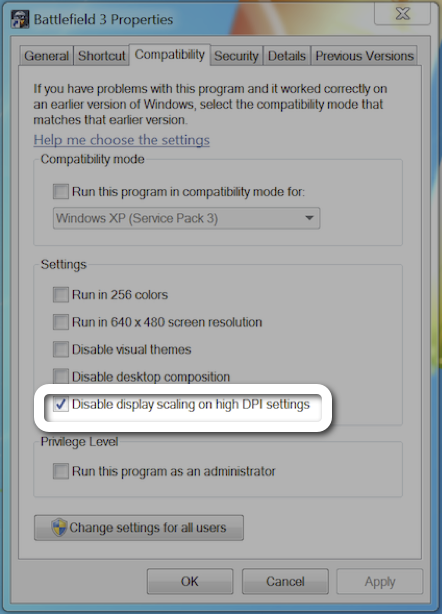
> I left it at 125% and just like he had suggested my color picker was working again! I finished the strip at 125% magnification with no trouble but then I had to switch it back to 150% when I was finished.
You can disable the DPI scale up in the compatibility tab of the file properties of the exe. In this case he could've set it for Sketchbook's exe and the rest of the OS would continue to be at 150%. Hopefully, this is just a temporary stopgap while application developers start supporting high resolutions.
I am really surprised that I keep reading blog posts, this one included, that state the only option for an iPad stylus is the eraser head style capacitive pieces of crap.
This entire post was about a tablet that runs uncomfortably warm, with buggy software, short battery life, tiny available user storage and an occasionally useful flip stand, but has a pressure sensitive stylus and it is the best. Oh yeah, and Microsoft gave him the device, so I dare say he didn't actually research his options.
Has no one heard of Jot? I'd be interested to read his comparison of the pressure sensive jot on his iPad to the Surface Pro.
I have one of the original Jots from their kickstarter project. Pressure sensitivity aside, it's just OK. The precision is way better than those crayon styluses, but it skips regularly (although I heard washing the tip with dishwashing soap helps). I've heard that Dagi's stylus, which is also a transparent-bullseye type of stylus, skips a lot less.
Why would you say that? He likes it, and he's given good reasons for why he does. His wife likes it, I can understand the reasons why she does as well.
You disagree with him, but you've given no reasons for it... Mr. Anti Microsoft drone.
--
As a developer, I still wouldn't buy the device. Partly because it's on the upper end of my budget, but for the most part because of the downsides: heat, lack of serviceability, and most of all I think the compromise that has to be made ie: not being able to use the keyboard while on the lap, is a deal killer. There are cheaper portable machines which are better for developers.
Gaming community has a lot less MS hate than other communities as well. Since you have to play Halo et. all if you want to have covered all the famous works, and they had the first good online community, etc..
Not using keyboard on lap is the biggest deal breaker for me, too. Waiting to see how some of these Asus clam-shell convertibles turn out, like that Asus Vivo Tab: http://www.asus.com/vivo/en/vivotab.htm
(But want something more spec'd like the Surface Pro)


Even though I don't have the same use cases as him, I feel like I got more out of it this way.