This looks wonderful, and I can't wait for these kinds of e-ink displays to get more affordable.
Looks like a perfect display for outdoors, very long trips (battery time?), long writing sessions, etc. I'd love to build a "DIY laptop" like that, but at these prices I'm likely better off with a Macbook Air...
I'm already experimenting with using a heavily desaturated/monochromatic color scheme for coding (it's working surprisingly well - e.g. using bold text to differentiate keywords).
I think most CLI apps are abusing color for little gain. Reading the output of some programs feels like wading through a room filled with fruit salad - the JS ecosystem is particularly bad in this regard. I'm using red in my prompt to indicate a root shell and/or an SSH session, and I think that's as far as it should go.
> If your stdout is not a terminal, and you're sending out escape codes, you're just spewing useless garbage.
That is just not the case, as the previous poster already said.
"prog | grep foo" outputs to the terminal. From prog's perspective it doesn't, but it does. Do you want escape sequences in there? Sometimes you do, sometimes you don't.
Even "prog | less" outputs to the terminal, indirectly, and less can interpret escape sequences.
"Always unconditionally output escape sequences" is wrong, but "always unconditionally disable them with isatty()" is also wrong. What a reasonable default is depends on the type of application and how it's likely to be used.
> What a reasonable default is depends on the type of application and how it's likely to be used.
No default (other than calling isatty) is reasonable, because you don't know (and you don't want to know) what your output is being piped through.
If you really must, add a flag to force enable/disable escape codes.
> "prog | grep foo" outputs to the terminal. From prog's perspective it doesn't, but it does. Do you want escape sequences in there? Sometimes you do, sometimes you don't.
What happens if "prog" outputs an escape sequence (e.g. set color) on one line, and outputs another one (reset color) a few lines down? grep might match one or the other, or none, or something in the middle. grep might want to output its own escape sequences (like it can do for highlighting a match). "prog" can't know what grep could possibly want to output, without inspecting grep's entire argument line, and effectively re-implementing all of grep - bug-for-bug, compensating for differences in GNU, BSD, BusyBox, etc.
There is no sane way to handle every edge case here, and you will get frustrated every time you hit one.
> Even "prog | less" outputs to the terminal, indirectly, and less can interpret escape sequences.
> Exactly because you don't know it makes sense to optimize for the common case.
What is "common"? What if I want grep to match text that has an escape code in the middle of it - do I have to first inspect the generated escape codes? What if I'm redirecting the output to a file, and opening that file in a program that doesn't process escape codes?
Every sane tool I know of calls isatty. It's only those that don't that cause problems.
> Yes, because it's useful.
Please read the article I've linked about "cat -v". There's no doubt someone (perhaps many people) find it useful; that doesn't mean it isn't a bad idea and/or a poor design.
> I can't wait for these kinds of e-ink displays to get more affordable.
Is there any indication that will happen? I’ve been impressed by the occasional E-ink hack too but displays larger than e-reader sizes seem to not drop in price.
This project caught my eye 2 or 3 years ago but it looks like the display used hasn’t come down in price at all:
> I think most CLI apps are abusing color for little gain. Reading the output of some programs feels like wading through a room filled with fruit salad - the JS ecosystem is particularly bad in this regard. I'm using red in my prompt to indicate a root shell and/or an SSH session, and I think that's as far as it should go.
I feel the same way. I still want colour on the CLI, but tend to configure my most commonly used tools and par back the colour almost completely, then use it very selectively for things that I want to stand out.
I think the only case it really makes sense to have colour salad is syntax highlighting, there's a lot of different types of things going on and the colour really does help to differentiate more easily.
I also find sticking to 16 ANSI colours really helps to manage the chaos and enforces consistency.
$1650 isn't cheap, but it's pretty normal for the high end of mid-range ultrabooks. It's less than I paid for my M2 MacBook Air, which has neither OLED nor E-Ink. Truly high-end laptops easily go for $2500+, but it is nice that more budget-friendly (sub-$1000) options that aren't terrible do exist these days.
I'm certainly excited to see reviews for that Lenovo laptop when it comes out.
You can't type on the e-ink side though. That would be the best, a simple laptop with an e-ink display, a good keyboard, nothing more. You could work anywhere you could also read a book!
There's also a dark variant, and a "base" variant to convince Emacs not to touch colors when running in a terminal. There's also support for matching the system theme in Emacs & Terminal.app on macOS: https://github.com/rollcat/dotfiles/commit/b3e49ad
I have also noticed that about the JS ecosystem, I would also like to add emojis as an example of something I see as abused in that ecosystem. There seems to be a lot of form-over-function going on over there, I wonder what characteristic of JavaScript developers inclines them to build their apps in that way.
I'd love an e-ink side monitor to browse documentation while I'm coding in the main screen or whatever, but certainly not for $750. $250, tops.
It's a shame the technology hasn't reached economies of scale yet despite the Kindle, it has so much potential for signage and other mostly static applications.
I keep looking at projects to turn old kindle units into extra screens or just using them as more generic devices, but I'd like something in the 10-to-14 inch range, preferably closer to the top end of that than the bottom. There are screens if that sort of size available, but there are issues there (expense of the screen itself, needing to make a case, the projects being pi based (those being silly expensive ATM) or requiring more electronics jiggery-pokery than I'd have time for (but would enjoy tinkering with & leaning if I could find the time!).
I dunno if you have one, I have 2 A4-sized reader, a Sony and a Boox, and it's insane. I paid both around 700$ and I dont regret (the boox has backlight).
You cant always whip enough factory workers in vietnam to transform resources mined in Myanmar for 250$, and sometimes you have to pay a bit more. I suppose most of the money goes to R&D to finally find a way to get high refresh rates, anyway.
I think nobody's sleeping on high margin for these things, collecting massive mountain of cash to buy sport cars. It's a difficult concept to bring up, this doubly stable state display that require electricity only on change. It's really worth paying for it to evolve.
As much as I agree with the general sentiment that we don't pay enough attention to the amount of exploitation going on during the production of electronics, doesn't the high price of eInk displays have more to do with one company hoarding all the relevant patents and scaring off the competition?
I've got a HiSense android phone with e-ink (the a5) which I had to order directly from China. It has great performance, I can watch YouTube videos on it. I mean it isn't a pleasant experience but I can. I wonder if it is using the forbidden algorithms? I should compare it to an e-ink reader that's sold in the US and presumably is following the relevant patent laws.
Damn it, I can’t justify $750 when I have heaps on perfectly fine monitors.
That would also be a very interesting post-apocalyptic computer monitor ( for the low consumption of it only, maybe it has drawback like being brittle, heavy, not durable ? )
I think in a post-apocalyptic world, you would be scraping the bottom of every bin to find any working electronic equipment at all. Check out http://collapseos.org/
> Some people doubt that computers will stay relevant after a civilizational collapse. I mostly agree. The drastic simplification of our society will mean that we have a lot less information to manage. We'll be a lot more busy with more pressing activities than processing data.
> However, the goal of Collapse OS is not to save computing, but electronics. Managing electricity will stay immensely useful.
> Q: Aren't there more important things to do than an operating system?
> Yes! Yes! Yes! A metric ton of projects are more important than Collapse OS with regards to civilizational collapse. This doesn't make Collapse OS useless.
> [...]
> However, when you look at it from a communal perspective, Collapse OS starts to make sense. Once a particular community already took care of its immediate survival and is looking at going from "surviving" to "thriving", if it has Collapse OS and someone who can make sense of it, then that community will have a great asset.
Ham radio for sure. The whole idea of ham radio is knowing how to make a radio out of nothing and experiment. In a collapse this would be extremely useful too.
If you're thinking of focusing issues, IIRC there is evidence that not getting exposed to enough UV light (read: sun light) during years our eyes develops may play a big part in that.
No idea if that would imply this is needed as an adult though. And that is assuming I don't misremember in the first place.
Yes focusing eyes close all day is the real culprit. But there is something about bright light of monitors that seems to impact my vision too, i am not quite sure what its callled though. I don't feel the same fatigue reading a book. Its just my personal experience.
One of these days, I want to make a terminal "optimized" for eink - as in, compute which parts of the screen receive the new characters, to invalidate them and do a quick refresh (leaving eink ghosting) on these leaving the rest of the screen pristine, then later do at an opportunistic time a better refresh (leaving no ghosting) on these to have no ghosting at all instead of leaving the selection of that time to the eink driver.
Eink refresh is slow-ish, but only because if say scrolling a bunch of pixels, you need to invalidate and redraw the whole screen.
The advantage of terminals is that you can easily keep a matrix of squares, and by looking at the flux of information, you can pick the opportunistic times for refreshes.
With characters, there should be more recouping. (a B and a P overlap except in the bottom right)
With line editing, the problem should be limited to the line
All these small gains should add up to provide an excellent terminal experience.
I am fairly certain that I have read that these types of optimizations (only change dirty characters) already exist in certain terminals. I wonder if the issue would be more how to get such an optimization to the display.
Although perhaps it automatically does a comparison between current and previous frame to do its own dirty-pixel optimization.
> I wonder if the issue would be more how to get such an optimization to the display
This
> Although perhaps it automatically does a comparison between current and previous frame to do its own dirty-pixel optimization.
Some do, like the Boox regal mode, but it stills feels a bit slow and leaves some ghosting. Baking that into the terminal would limit the comparison to the invalidated area, which in a terminal would be a smaller square that the full screen frame, so I'd expect some speed gains.
I wonder if maintaining a buffer in software that counts for each pixel how many times it has been dirty, combined with, say, the kind of quadtree one would normally use for hit detection, would let one do "local" refreshes and make this a generic solution. It sounds like the kind of thing that someone already must have thought of (let's hope it's not one of the software patents holding e-ink back)
Much to my regret, I've never experienced 300 baud terminals (too young for this) I've just heard about how great their hardware was. I'm a huge admirer of terminals and especially obscure stuff like sixel and regis.
Right now, we seem to be in a vi revival period, and we've new hardware (eink) that bring back old problems (latency + screen update speed) vi was made to tackle, along with new ones (2 refresh modes, one of which can leave ghosting) that should be easy to fix.
So I can't help but notice how vim on eink just needs this one little extra thing to give a great experience on modern hardware
One of the main parts of computer usage that causes eye strain is blur. CRTs only started solving this problem around the early 2000s and got discontinued shortly after. LCDs solve it for static images but not moving. E-ink will naturally have the same problem. Any moving image will appear blurry and your eye will try to focus on it and repeatedly fail, causing muscle fatigue.
Digression - This is of course less of an issue if you use the terminal in a style where you just move one page at a time, but you're just restricting yourself to a subset of possible use cases. I scroll in the terminal with the mouse wheel for skimming.
To solve motion blur, you either need strobing (along with a refresh rate above the flicker fusion threshold: ~80Hz), which E-ink will never have, or a high refresh rate, something like 240Hz. Still, if E-ink could even reach 50Hz it would be a massive improvement over LCD for use cases that don't require color.
E-ink does solve the pixel density problem and viewing angle problem (reducing eye strain and bad posture). Overall I'm still using high end CRTs for all use cases, and will switch to OLED once they get proper strobed offerings without all kind of bugs (and I'm still not sure if OLED fixes viewing angle shift. IPS-type LCD certainly didn't).
The self-luminescence problem that E-ink solves is also nice, but I'm not sure it matters much (it used to be my biggest pet peeve); you can just take an OLED which supports nice low luminescence levels at or below 120cd/m^2 (unlike most LCDs) and roughly match your room lights to it.
Low framerate and input lag will also cause eye strain and bad posture, respectively.
gives me nostalgia of the late 90s when some of my friends had those new experimental LCDs, the same aspect ratio, the same slow pixel response, interesting frame, and brands I've never heard of.
Buried the key sentence. That's pretty wild. Isn't any CRT now 20+ years old and consequently a small fraction of its design brightness? Or do you have old stock and you open a fresh box every 5 years?
I know there wasn't a lot of old stock of CRTs are the end of the CRT era because when I needed a warranty fix on a Sony 21" Trinitron FD in the final year of its 5-year warranty they said they could not repair or replace it and they send me a 24" model instead. When that one broke they could not fix or replace and paid me out for the warranty.
You only want your brightness to be something like 120cd/m^2 which is well below what most LCDs even let you adjust down to (even though that's what sRGB and all such common color spaces were designed for). A new CRT will go way above that until you adjust it down. Only got back into CRTs recently and collected a bunch from secret hookups.
I was surprised at how good a fake game like Genshin Impact looks compared to even the highest contrast VA LCDs. The difference is night and day. But then again the game spent all their budget on graphics and marketing.
Not the person you asked, but I still have and occasionally use an old 19" aperture grille CRT from right before the switch to flat panels. Brightness is still approaching eye-bleed if I crank it to max.
Arrrgh, maybe if I win the lottery one day I can create an e-ink coding and documentation setup. Would have to be Linux because newer Macs don't support more than 2 external displays unless you get the most powerful CPU.
It's very hard to achieve even 2:1 real contrast ratios with color LCDs, because "white" light passing through color filters loses 80-90% of visible luminance (eg each green filter only covers ~30% of the area and passes <50% of lambertian daylight). This means the reflections off the front of the screen need to be less than 5-10% of ambient light. It's even worse for anything other than white or for specular light. Almost all LCDs are made trans-flective for this reason.
If you went with B/W LCDs you can improve this by ~3x and might achieve 5:1 contrast with good antireflective surfaces. That's what you see in car LCDs.
I've been using a Dasung Paperlike HD-FT since early 2020, and I'm still very happy with it. I have a similar setup, but only need to switch monitor to see details in videos or colored images. The refresh rate isn't normally an issue with GUIs, and most of the websites that I visit are usable in 4 bit monochrome.
Years ago Dell had a laptop with an e-ink display. Lenovo has a laptop with an e-ink display on the cover so you use it like a tablet, but the "normal" screen is LCD. I think a company called Modus is working on making a laptop with an e-ink for the regular screen.
Lenovo has a new version coming where you can twist it around and use the new (larger, color) e-ink screen as the primary screen, and the other side has an OLED panel, which is an awesome combination: https://www.theverge.com/2023/1/5/23541379/lenovo-thinkbook-...
I really want to try vim on an e-ink some day. If I find the experience to be alright, I'd totally buy one of those pinenotes for programming (assuming I'd be able to connect a normal keynoard to it). Too bad big e-ink displays are so rare and expensive.
Yes, yes, yes. I have bought a screen and plan on integrating exactly this sort of setup into my routine, mainly for the focus benefits the author notes.
I guess I'll have to disagree with everyone's enthusiasm about eink here. I haven't tried any recent ones, but the Kindle and Kobo ones I used were awful. Low contrast, inconsistent lighting and soul-crushing lag. I'd rather use the crappiest LCD tablet than an eink reader for reading ebooks, and I read a lot.
I can't imagine using one as a general monitor.
Maybe if you live in a sunny place they have some merit? I can't remember the last time I couldn't read a regular screen living in England.


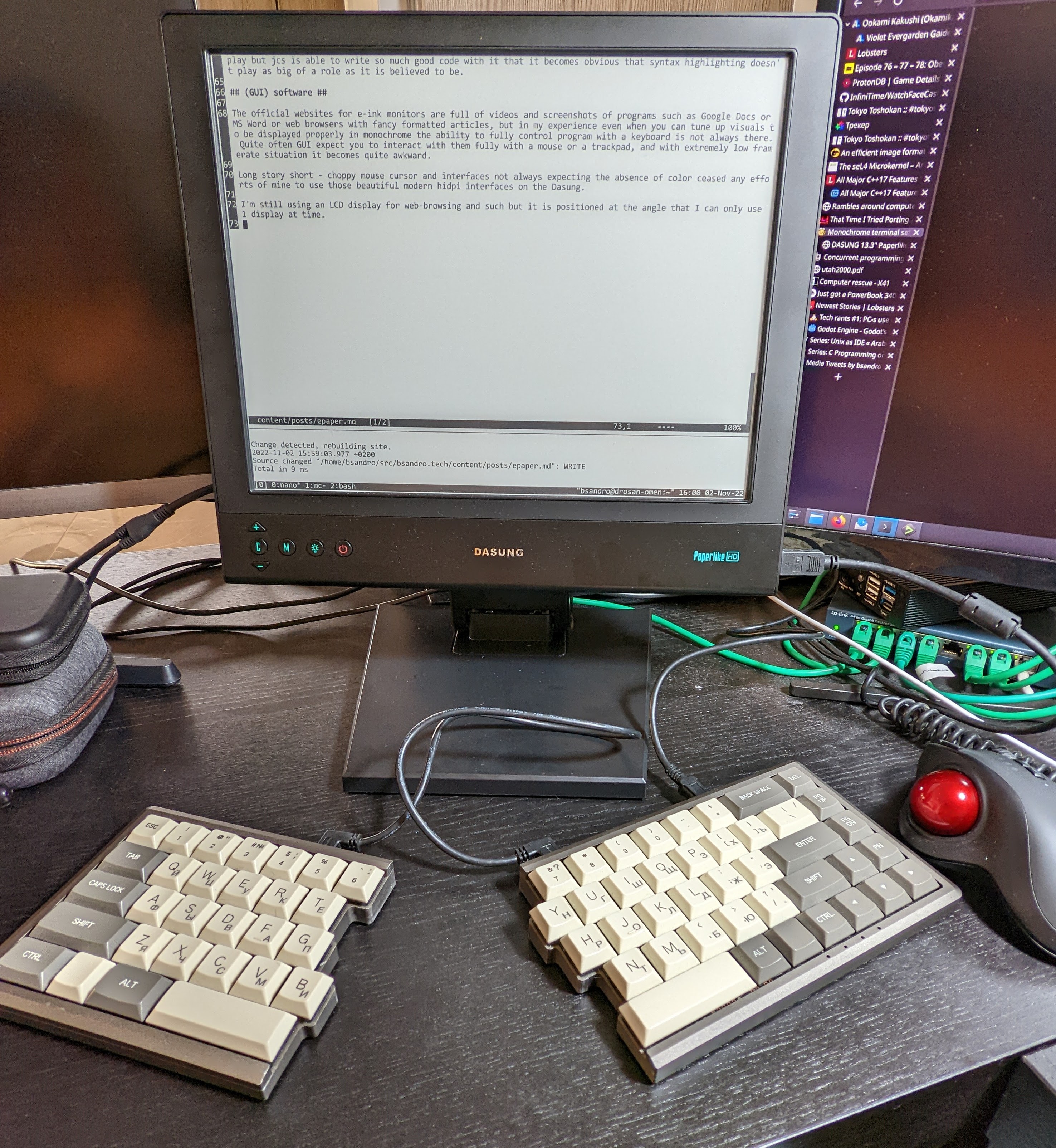
Looks like a perfect display for outdoors, very long trips (battery time?), long writing sessions, etc. I'd love to build a "DIY laptop" like that, but at these prices I'm likely better off with a Macbook Air...
I'm already experimenting with using a heavily desaturated/monochromatic color scheme for coding (it's working surprisingly well - e.g. using bold text to differentiate keywords).
I think most CLI apps are abusing color for little gain. Reading the output of some programs feels like wading through a room filled with fruit salad - the JS ecosystem is particularly bad in this regard. I'm using red in my prompt to indicate a root shell and/or an SSH session, and I think that's as far as it should go.